
Sculpt the way you already do
Fourteen brushes including Clay Buildup, Dam Standard, Snake Hook, Trim and Move, with alphas, lazy mouse, symmetry, tablet pressure, ZBrush-style navigation, subdivision and voxel remesh.
The free, open-source alternative to ZBrush
Digital sculpting for VFX, animation and game studios on Linux, macOS and Windows: the brushes, symmetry and navigation ZBrush artists already know, with no subscription. It ships VFX Reference Platform builds, OpenUSD and a Python API for studio pipelines, one-click game-ready LODs and Send to Unreal, plus free built-in AI: describe a brush and Brush Lab builds it, or turn a sketch or a sentence into a model you can sculpt.
ZBrush-style sculpting for VFX, animation and games, with VFX Reference Platform builds, OpenUSD and Python, plus free built-in AI: an AI brush creator and sketch to 3D.
A focused sculpting app that starts instantly, works offline and fits straight into VFX, animation and game pipelines.
Fourteen brushes including Clay Buildup, Dam Standard, Snake Hook, Trim and Move, with alphas, lazy mouse, symmetry, tablet pressure, ZBrush-style navigation, subdivision and voxel remesh.
Hold Ctrl to paint a mask, mask by cavity, and grow, shrink or blur it. Auto-group by angle or by piece, then Ctrl+Shift+click to isolate a group and work on just that part.
Keep the body, eyes, teeth and armour as separate meshes. Append, split, merge and solo them, Alt+click to pick one, and export each as its own object to glTF, FBX, USD or straight back to ZBrush.
Paint colour straight onto the sculpt, tint the cavities, and judge forms under Red Wax, Clay, Skin, Bronze, Chrome or White materials.
Open and save GoZ files with polygroups, masks, UVs and polypaint, and send models to and from ZBrush on Windows and macOS. Project files keep everything, with autosave and crash recovery.
"Dry cracked mud." "Overlapping dragon scales." An AI turns words into a brush you can tweak with sliders. Share it with a brush code, a studio folder or the community gallery.
Reconstruct a full, sculptable model from a sketch, a piece of concept art or a description, for free through Hunyuan3D, TRELLIS.2 and Stable Fast 3D on Hugging Face, on your own ComfyUI, or with fal.ai or Meshy.
Sculpt layers become blend shapes and morph targets, and a whole LOD chain is one click. Export FBX, glTF, OpenUSD, OBJ and PLY, checked with the Khronos and OpenUSD validators.
One click imports or updates your asset in a running Unreal Editor, on this computer or another one on your network. Static meshes come with LODs, skeletal meshes with morph targets.
Load phone captures as a sculpting reference, turn them into watertight meshes, or turn your sculpt into splats. Supports PLY, .splat, glTF KHR_gaussian_splatting and OpenUSD.
Run any ComfyUI workflow on your own GPU or studio server to generate models straight into SculptForge, and use SculptForge's remesh, LOD and USD/FBX export nodes inside ComfyUI graphs.
sculptforge-cli runs any operation headless for build farms. Its built-in MCP server
lets Claude Code, Claude Desktop or any MCP client sculpt, convert and export.
VFX Reference Platform CY2026 · CY2027
SculptForge follows the VFX Reference Platform and is built and tested in its reference environments on every commit. There's no licence server, no seats and no accounts, and every editor action is scriptable from Python or the command line.
import sculptforge with NumPy mesh accessUSDA and USDZ, with each SubTool as its own Mesh prim and sculpt layers as UsdSkel blend shapes.
Exports are checked with OpenUSD's usdchecker.
rez-build --install puts the app and CLI on PATH and the Python module on
PYTHONPATH.
sculptforge-cli runs every operation without a display: remesh, decimate, LODs, USD, FBX
and glTF export. Turntables and review images render offscreen.
No Qt, Boost, TBB or OpenEXR to clash with the versions your other tools load. The few dependencies are linked statically.
No licence server, telemetry or account. It runs on air-gapped workstations and farm nodes.
GPL-3.0: fork it and wire it into your asset system. In-house changes can stay in-house; you only share source if you distribute a modified version outside your organisation.
# Python 3.13, inside your pipeline
import sculptforge as sf

doc = sf.Document()
sf.run(doc, "open", path="/show/troll/troll_base.fbx")
sf.run(doc, "remesh", resolution=320)
sf.run(doc, "export_usd", path="/show/troll/troll_sculpt.usda")
verts = doc.vertices            # NumPy (N, 3) float32
# Deploy with Rez, run anywhere on the farm
rez-build --install
rez-env sculptforge -- sculptforge-cli -c \
'open path=troll.fbx; export_lods path=troll.glb levels=4'
rez-env sculptforge -- sculptforge troll.usda \
--render review.png --turntable 8Every clip is a real, unedited recording of the app, made with its built-in demo recorder. Waits for AI models are sped up and labelled on screen.
Type "dry cracked mud", and AI designs the brush. Then ask for "deeper cracks, sharper edges". It's free out of the box with no key. This clip uses a small open model running on the same machine, so nothing leaves the computer.
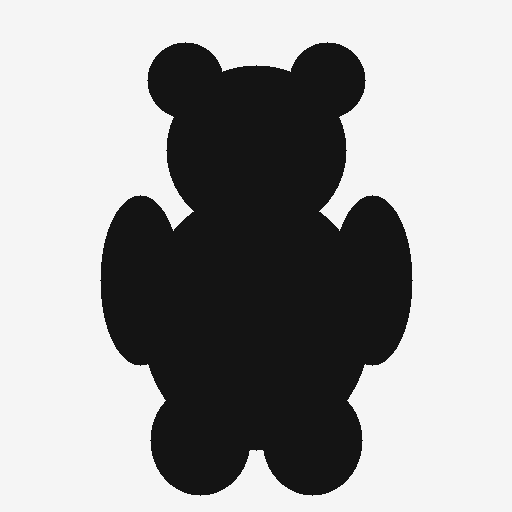
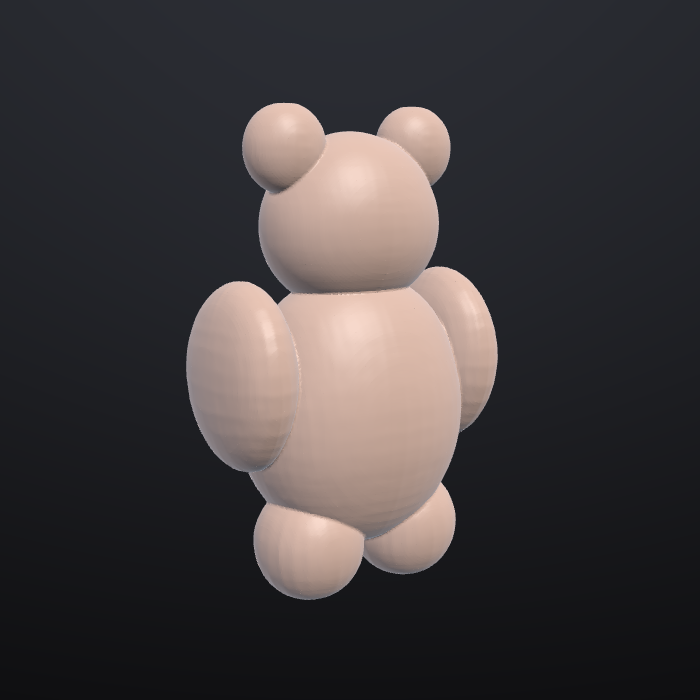
A quick drawing became a full 3D model, with separate ears, arms and legs, a back and real depth. It was made with the free Hunyuan3D 2.1 model, then voxel-remeshed into one clean surface ready to sculpt. You can also type a description instead of using an image.
Sculpt an expression on its own layer and play it back. Generate a LOD chain and inspect each level, then send a static mesh with LODs, or a skeletal mesh with morph targets, to Unreal Engine.
Turn a sculpt into Gaussian splats for web viewers and engines, and turn splat captures into watertight meshes in under a second.
Two AI tools work out of the box at no cost and with no sign-up. Every AI feature is optional and talks directly to the service you pick. SculptForge has no servers, no account and no telemetry.
Each model has its own licence. For example, Tencent's Hunyuan3D isn't licensed for use in the EU, UK or South Korea. See the AI services and privacy guide.
| SculptForge | ZBrush | Blender | Nomad | |
|---|---|---|---|---|
| Price | Free | Subscription | Free | Paid |
| Built for sculpting | Yes | Yes | General 3D suite | Yes (mobile first) |
| Open source | GPL | No | GPL | No |
| Native Linux | Yes | No | Yes | No |
| Send to Unreal | Built in | Plugin | Add-on | No |
| Image / text to 3D | Built in | No | Add-ons | No |
| Gaussian splats | Built in | No | Add-ons | No |
| AI agent control (MCP) | Built in | No | Add-ons | No |
| VFX Reference Platform builds | CY2026/27 | No | Yes | No |
SculptForge is young. It doesn't yet have retopology, UVs or texture painting. See the roadmap.
Version 0.2.0. All builds come from the latest GitHub release, with SHA-256 checksums.
yay -S sculptforgepackaging/rez · build and install your own package
The builds aren't code-signed yet. On macOS, right-click the app and choose Open the first time. On Windows, if SmartScreen appears, choose More info → Run anyway. You can also build from source.
Yes. SculptForge is free under the GPL-3.0, and you own everything you sculpt with it. The GPL covers the program's source code, not your models. If you use an AI model to generate a starting point, that model's licence also applies (see the AI services guide).
No. Sculpting, layers, LODs, remeshing, file formats and Send to Unreal all work offline with no AI at all. The AI tools are extras you can switch to a local model or simply ignore.
It targets Unreal Engine 5. It uses Unreal's built-in Python remote execution, so you only enable the Python plugin and tick "Enable Remote Execution"; there's nothing to install in your project. You can always export an Unreal-ready FBX instead.
For many sculpting and game-asset jobs, yes. Blocking out, sculpting forms and detail, blend shapes, LODs and getting assets into Unreal, glTF or USD all work today, with familiar brushes and controls. Masking, polygroups and hide/show, polypaint, MatCaps, project files and GoZ exchange with ZBrush work too, with the controls ZBrush users expect. SculptForge doesn't yet have multiresolution subdivision levels, dynamic topology, ZRemesher-class retopology or UV unwrapping, and it can't open ZBrush's .ZTL files (use GoZ, or export OBJ or FBX from ZBrush). It's an independent project, not affiliated with Maxon.
Yes. Every release includes VFX Reference Platform CY2026 and CY2027 builds (Rocky Linux 8 and 9, GCC
14.2, Python 3.13), there's a Rez package, and everything the app does can be scripted from Python or the
headless CLI. It reads and writes OpenUSD (USDA/USDZ), FBX and glTF. Binary .usdc, USD
references and OpenColorIO aren't supported yet. See the
studio guide.
Try it, report bugs, share brushes, and send pull requests. See CONTRIBUTING.md.